Best Ways to Encourage Customers to Leave Reviews
Give customers a moment worth mentioning, ask while it is fresh and make reviewing a single tap. Eight methods that work, and five that backfire.

The best ways to encourage customers to leave reviews are to give them a moment worth mentioning, ask them personally while that moment is fresh, and remove every bit of effort between the request and the review box: a direct link, a QR code, a message that arrives the same day. Then reply to what they write, so the next customer can see that reviews are read. Rewards, competitions and scripted praise are off the table; they break Google's rules and, in the UK and US, the law.
That sounds simple, and it is. What separates businesses with a healthy stream of reviews from those with a dozen old ones is not cleverness but consistency. Below are the methods that work, in the order we would put them in place.
What makes a customer want to write
Before tactics, it helps to know what customers actually write about when they are happy. In the 524,000 recent Google reviews we have collected across 130 local markets, 41% of five-star reviews mention friendly, helpful or kind staff, 31% say they would recommend the business, and 23% praise someone as professional or knowledgeable. Price and value appear in just 5%.
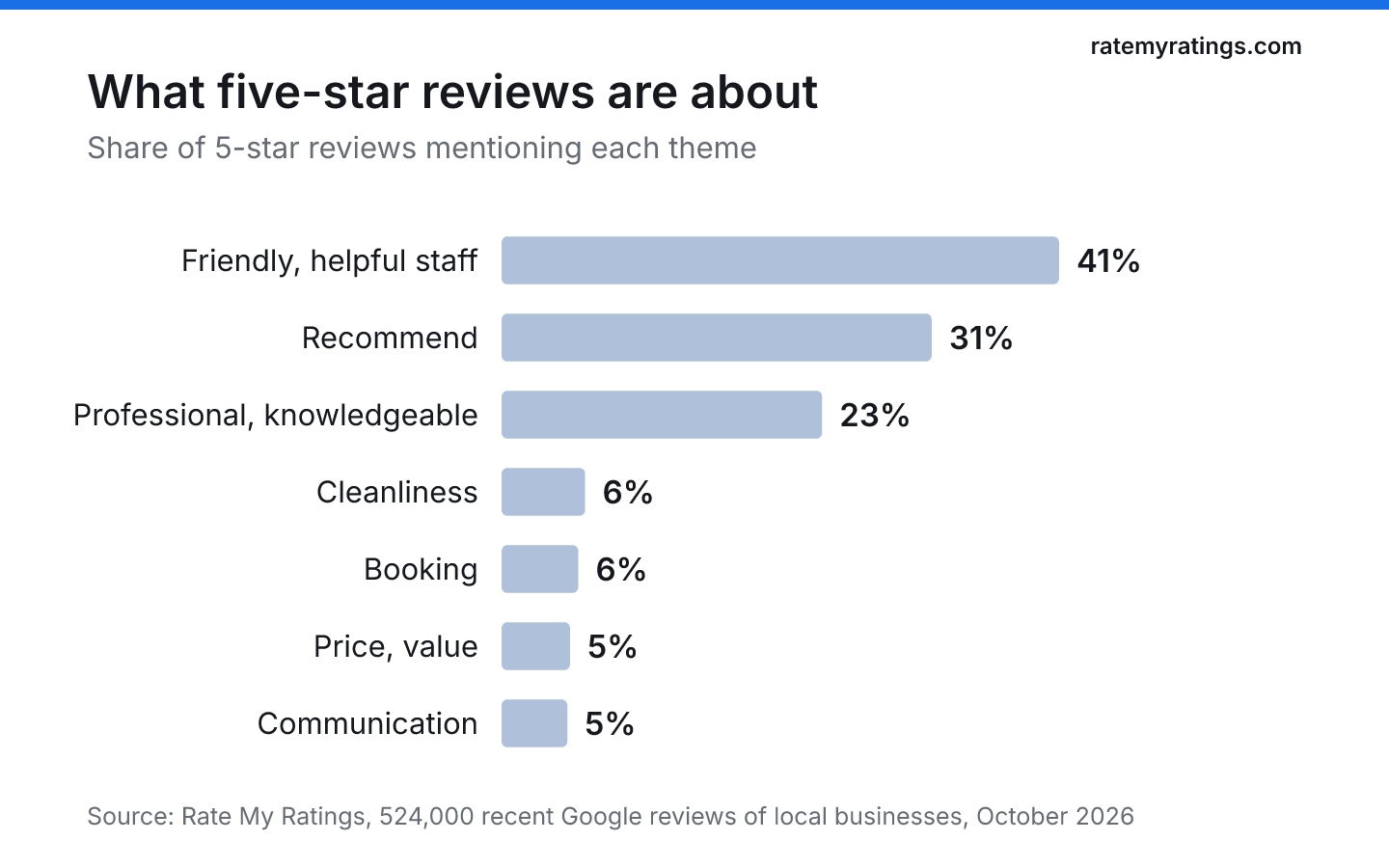
Five-star reviews are about people. Customers write when someone made them feel looked after, explained something clearly or went beyond the job. So the first way to encourage customers to leave reviews has nothing to do with asking at all: it is giving them a person and a moment to write about.
1. Ask in person at the high point
A face-to-face request at the right moment beats any automated message. The vet nurse who has just reassured a worried owner, the mechanic handing back keys to a car that drives smoothly again, the stylist showing the finished cut: each is the best possible time to say, "If you have a minute later, a Google review would really help us."
Keep it to one sentence, welcome any honest view, and give them a way to do it later rather than watching them do it now. Google's content policy bars businesses from pressuring customers to review while on the premises. Our guide to asking for Google reviews without being annoying has wording you can use.
2. Make leaving a review a single tap
Every extra step loses people. "Search for us on Google and find the reviews bit" will cost you most of the reviews you were promised.
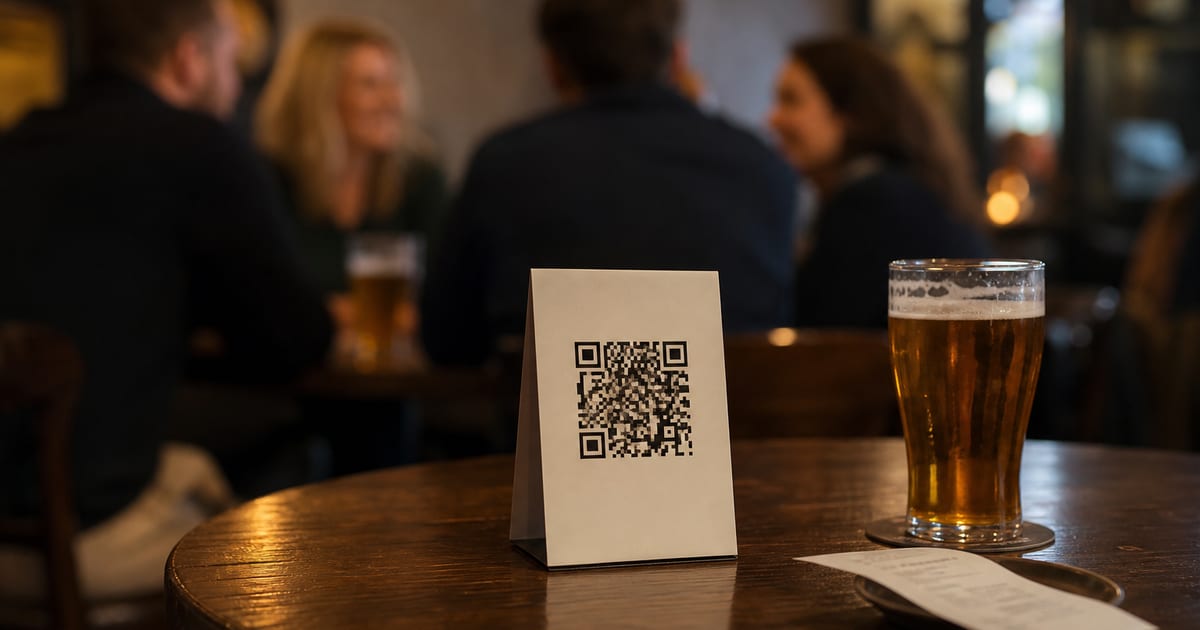
Get your direct review link and QR code from your Business Profile. Google's guide to creating a review link or QR code explains the steps: open your profile, choose Read reviews, then Get more reviews. Then put that link everywhere a satisfied customer will see it:
- Printed receipts and invoices
- A small card handed over at the end of the visit
- A sign or table card at the counter, in the waiting room or at the till
- Booking confirmations and aftercare emails
- Your email signature and the end of chat conversations
3. Follow up the same day by message
People who meant to leave a review forget. A short text or email sent within a few hours of the visit, with the link inside, catches them while the experience is fresh. Personalise it with their name and what you did for them. One reminder a few days later is fine; after that, let it go.
When the message arrives matters too. In our UK data, most reviews are posted during the working day and Sunday is the quietest day of the week. Our article on the best time to ask for a review goes into the hours that work best.
4. Tell customers why it matters to you
An honest reason works better than a generic plea. "We're a small independent practice and most new clients find us through Google" gives the customer a reason to help that is about people, not marketing. Many customers simply do not realise how much a single review means to a small business.
5. Reply to every review
Replies are an invitation to the next reviewer. They show that a real person reads what customers write, and they make your profile feel alive. BrightLocal's 2026 Local Consumer Review Survey found that 89% of US consumers expect businesses to respond to reviews.
In our data, 53% of recent reviews have a reply from the business, and replies usually come within about a day. Three-star reviews are the least likely to be answered, at 42%, which is a missed chance: a thoughtful reply to a middling review often shows more about a business than a thank-you to a glowing one. Our guide to responding to negative Google reviews covers the difficult ones.
6. Build it into the team's routine
Encouraging reviews works when it is part of how the business runs, not something the owner remembers on a quiet Tuesday. Agree who asks, when, and how the link gets sent. Mention new reviews in team meetings, especially the ones that name a colleague. Celebrating the reviews you receive is a powerful motivator.
What you must not do is give staff targets. Google's policy treats asking staff to collect a set number of reviews as rating manipulation, and quotas push people towards exactly the pressure tactics customers dislike.
7. Show the reviews you already have
Customers are more likely to write when reviewing is visibly normal for your business. Mention your Google reviews on your website, share a recent one on social media with the customer's permission, and put a "Find us on Google" sign by the door. Social proof encourages more of itself.
8. Fix what people complain about
The quickest way to more good reviews is fewer reasons for bad ones. In our data, one- and two-star reviews are mostly about process rather than people: 25% mention price or fees, 22% communication, 22% booking or cancellations and 18% waiting. Fixing a booking system or calling customers back promptly often does more for your reviews than any request. Our article on what customers look for in reviews explains how readers weigh these themes.
What not to do
Some popular tactics will cost you more than they earn:
| Tactic | Why it fails |
|---|---|
| Discounts, freebies or prize draws for reviews | Google strictly prohibits incentives in exchange for reviews; such reviews can be removed |
| Asking only customers you think are happy | Google's policy forbids selectively soliciting positive reviews |
| A tablet or kiosk for reviews on the counter | Reviewing on the premises under staff eyes counts as pressure |
| Reviews from staff, friends or family | A conflict of interest under Google's policy, and fake under UK law |
| Suggesting what to write or which stars to give | Requesting specific content is rating manipulation |
The legal stakes are real. The UK's Digital Markets, Competition and Consumers Act 2024 bans fake reviews and reviews that hide an incentive. Our article on what not to say when asking for a review lists the phrases to avoid.
How to encourage customers to leave reviews every week
If you put only three things in place this month, make them a direct review link on every receipt and confirmation, a same-day follow-up message, and a reply to every review within a couple of days. For the version that runs without anyone remembering to ask, see how to get more Google reviews without asking constantly.
And if you want to know how your reviews stack up against every competitor nearby, what their customers praise and what they complain about, a Rate My Ratings market report reads the whole local market for you.
The short version
- Give customers a person and a moment worth writing about: 41% of five-star reviews mention friendly staff.
- Ask personally at the high point, then make reviewing a single tap with a direct link or QR code.
- Follow up once, the same day, by text or email.
- Reply to every review, including the three-star ones most businesses skip.
- Never offer rewards, gate reviews, use kiosks or set staff quotas.
Frequently asked questions
- How do you encourage customers to leave a review?
Ask personally at the moment they are happiest, then make it effortless with a direct Google review link or QR code on receipts, cards and follow-up messages. Send one reminder the same day or a few days later, tell them honestly why reviews matter to you, and reply to the reviews you receive so customers can see they are read.
- Can you give customers a reward for leaving a review?
Not for Google reviews. Google strictly prohibits offering incentives such as discounts, free products or prize draws in exchange for reviews, and those reviews can be removed. In the UK, reviews that conceal an incentive are banned under the Digital Markets, Competition and Consumers Act 2024. Thank customers instead, and make reviewing easy.
- Why don't happy customers leave reviews?
Mostly because nobody asked and it felt like effort. Unhappy customers are motivated to write without prompting, which is why one-star reviews in our data are nearly three times longer than five-star ones. Satisfied customers need a clear request, a direct link and a reason, such as knowing that reviews help a small business be found.
- Should you reply to positive reviews?
Yes. A short, personal reply to positive reviews shows that real people read what customers write, which encourages others to leave reviews too. Thank the reviewer by name, mention something specific from their visit and keep it brief. Avoid adding promotions or offers to your replies, which Google advises against.

Rate My RatingsNewsletter
What reviews say about local markets, in your inbox.
New articles and findings from the blog, as they're published.
Check your inbox.
If this address isn't subscribed yet, we've sent it a link to confirm. Nothing is sent until you click it.
That didn't go through. Check the email address and try again.
Hold on a moment, then subscribe again.
Rate My RatingsNewsletter
What reviews say about local markets, in your inbox.
New articles and findings from the blog, as they're published.
Check your inbox.
If this address isn't subscribed yet, we've sent it a link to confirm. Nothing is sent until you click it.
That didn't go through. Check the email address and try again.
Hold on a moment, then subscribe again.