
Google Business Profile suspended: how to get it back
A suspension is a policy decision, not a glitch. Find the rule Google applied, fix it before you appeal, send one appeal with matching documents, and never open a second profile while you wait.
Google Business Profile suspended? Find the rule Google says you broke, fix it, and then send one appeal through Google's appeals tool with documents whose business name and address match the profile exactly. Google says appeal decisions can take up to five working days, though owners have waited weeks when suspensions spike. Do not open a new profile for the same business in the meantime: Google's help pages tell you not to.
A suspension is a policy decision, not a technical fault, so the fastest route back is to work out which policy Google applied. This guide explains the words Google uses, the usual causes, what evidence to gather, how long it takes, and how to avoid a repeat.
Suspended, disabled or restricted: what Google's terms mean
Google's help page on fixing suspended or disabled profiles uses two words for a profile it has acted against, and a third for the account behind it. Its overview of Business Profile policies gives an example of each.
| What you see | What Google means | What to do first |
|---|---|---|
| Profile suspended | The profile broke a guideline, such as using a PO box as its address | Fix the cause, then appeal the profile |
| Profile disabled | Google believes the business does not exist at that location | Gather proof of the premises, then appeal |
| Account restricted | The Google Account is not in good standing, so every profile it manages is suspended | Appeal the account first, then the profile |
| Edit not approved | A change to the name, category or address was rejected | Check the change against the guidelines |
| Posts, photos or videos restricted | Content was removed or held back | Appeal the content once the profile is live |
Agency guides also talk about "soft" and "hard" suspensions, or a "limited" profile, but those are not Google's labels. Go by the decision in the appeals tool, which shows the date, the reason, the policy and whether you can appeal.
Why do Google Business Profiles get suspended?
Most suspensions trace back to a handful of rules in Google's guidelines for representing your business. These are the ones owners trip over most often:
- An address customers cannot visit. A virtual office is not eligible for a profile, PO boxes and mailboxes at remote locations are not acceptable, and a co-working office qualifies only if it has clear signage, receives customers and is staffed by your business during opening hours.
- A service-area business showing its address. If you go to customers and do not serve them at your premises, Google's service area guidance says to remove the address from the profile. You can list up to 20 service areas, and the whole area should not stretch beyond about two hours' drive.
- Extra words in the name. Google says unnecessary information in the business name is not permitted and could result in suspension. "Smith Plumbing" is a name; "Smith Plumbing Emergency Plumber Leeds" is a name plus keywords. Our guide on why a competitor with fewer reviews can rank higher explains why rivals sometimes get away with it for a while.
- Big edits all at once. Google may reject edits that change the business's identity, such as its name or category, and a recent change is the usual reason Google asks a business to verify again.
- More than one profile. Google wants one profile per business at each location, whether in one account or across several.
- A problem with the Google Account. If the account is restricted, every profile it manages is suspended with it.
- A business type Google does not list. Lead generation companies, online-only brands and rental or for-sale properties are among Google's examples of businesses without the in-person contact a profile needs.
Some suspensions have no obvious cause. In May 2026, Search Engine Roundtable reported a wave of profile suspensions that appeared to follow user account restrictions, including on accounts whose owners said they had done nothing unusual. Google did not explain it. If yours looks like that, check the account before the profile.
Google Business Profile suspended? Fix the cause before you appeal
An appeal is a request to look again, so it only works when the profile now follows the rules. Google's page on appealing profile restrictions says each appeal can be submitted only once, so do the work first.
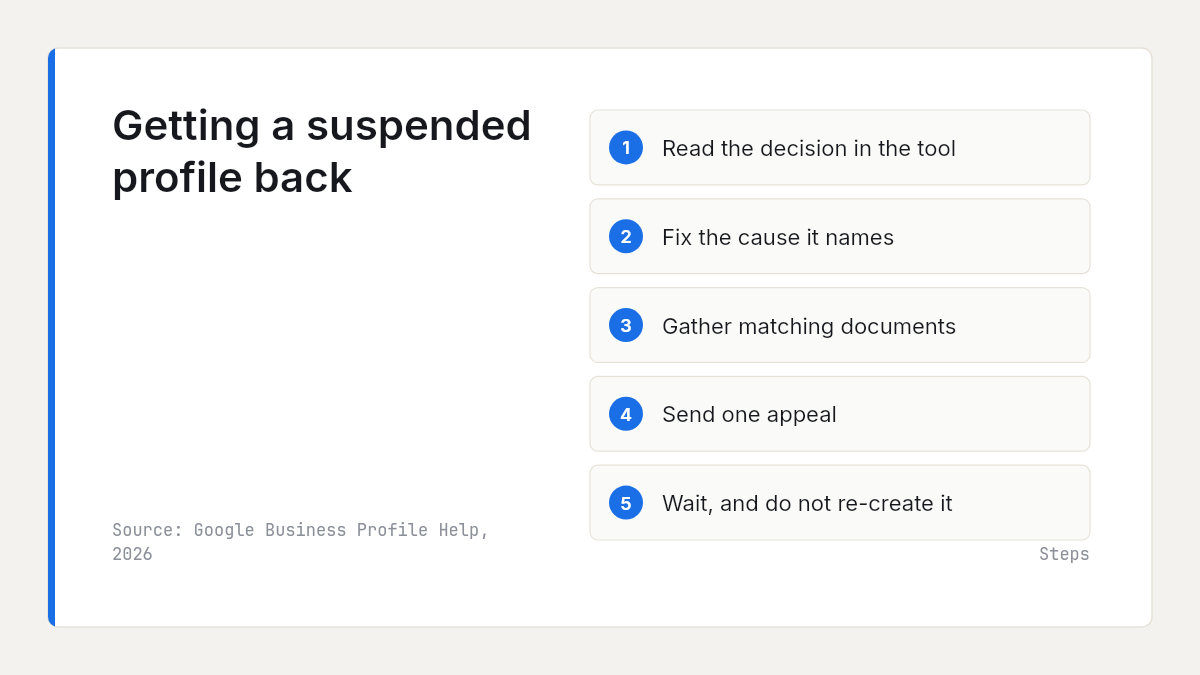
- Read the decision. Open the appeals tool from Google's help page, sign in with the account that owns the profile, select the profile and open the decision. Note the reason and the policy it links to.
- Check the account. If the account itself is restricted, appeal that first from the restrictions page in your Google Account. The profile cannot be reinstated while the account is restricted.
- Compare the profile with the policy, field by field. Check the name against your signage and website, the address against where customers actually come, then the service areas, categories and phone number. Our guide to choosing Google Business Profile categories covers the category rules.
- Correct the real world, not just the profile. If your signage, website or invoices show a different name or address, change those too. The appeal is judged against evidence.
- Gather documents that match (next section).
- Submit one appeal. Upload the evidence, write two or three plain sentences saying what was wrong and what you changed, tick the confirmation and submit. Google emails the decision.
What evidence should you send?
Google lists four kinds of optional evidence: official business registration, a business licence, tax certificates, and utility bills for the business (electricity, phone, water or internet). The business name and address on each document must match the profile you are appealing.
For a UK business that usually means:
- Registration: for a limited company, the certificate of incorporation or its Companies House record, under the name the profile uses.
- A recent bill in the trading name at the address on the profile, if customers come to you there.
- A licence, where your trade needs one, such as a premises licence for a pub.
If the documents carry a different name from the profile, sort out the mismatch before you send anything. A trading name that differs from the company name is normal; say so in your explanation and include a document that shows both.
Google may also ask you to verify the business again, and video is a common method. Its verification help says a live video call should show the location (outside signs, nearby businesses or a street sign), the business (products, branded equipment or tools) and proof that you manage it (staff-only areas, business documents or keys).
How long does an appeal take?
Google's appeals page says reviews and decisions "can take up to five working days". A Google Business Profile suspended for a clear reason, fixed and appealed with matching documents, is the case that figure describes. When suspensions surge it can take much longer: in March 2025 Search Engine Journal reported a Business Profile forum expert's estimate, drawn from forum posts, that appeals were taking nearly five weeks.
The appeals tool shows one of five statuses: Submitted, Approved, Not approved, Can't be appealed, or Eligible for appeal. If the answer is Not approved, Google says you may be able to request an additional review, with evidence you did not send the first time. Once the profile is back, UK businesses can use the same tool to appeal rejected edits and restricted photos, videos or posts.
What not to do while you wait
- Do not create a new profile. Google's help says "Do not create a new Business Profile for the same business." A second profile is a duplicate, which breaks the guidelines too, and it starts with none of your reviews.
- Do not send the same appeal twice. Google asks you to wait for a decision before appealing the same issue again.
- Do not keep editing. Every change to the name, address or category gives Google something new to check, and a profile under review is the worst time to test ideas.
- Do not pay for guaranteed reinstatement. Nobody outside Google can reinstate a profile; an agency can only prepare the appeal you could file yourself.
How to stop it happening again
- Keep the profile name exactly as it appears on your signage, website and invoices.
- If you serve customers only at their homes or sites, keep the address hidden and the service areas within Google's limits. Our guide to ranking in surrounding towns covers what service areas do and do not do for ranking.
- Keep one profile per location, and search Maps now and then for an old duplicate.
- Keep the owning Google Account secure, add staff and agencies as managers rather than sharing a login, and remove people who leave.
- Change one important field at a time and write down the date, as our guide to whether your Google Business Profile is working suggests. If something goes wrong, you will know which edit caused it.
If the profile is live but has vanished from the searches you care about, a suspension is probably not the cause: start with what to check if you dropped out of the map pack or why your business is not showing up on Google Maps.
Where reviews fit
A Google Business Profile suspended for even a few days takes your reviews out of sight along with everything else, and that history took years to build. It is the best argument against starting again with a new profile: the original holds the record customers read.
Once you are back, check where that record stands. A Rate My Ratings market report shows every competitor's Google rating, review count and share of positive reviews in your category and area, and the themes customers praise and complain about across the market.
What to do this week
- Open the appeals tool and write down the exact reason and policy Google gives.
- Check your Google Account for a restriction, and appeal that first if there is one.
- Compare the name, address and service areas with Google's guidelines, and fix the real-world mismatches.
- Collect a registration document and a recent bill that match the profile's name and address.
- Submit one appeal with a short, factual explanation, and put a reminder in your diary for five working days later.
Frequently asked questions
- How long does a Google Business Profile suspension last?
Google gives no expiry date: a suspended profile comes back when an appeal or an additional review is approved. Google says appeal decisions can take up to five working days, but owners have reported waits of several weeks when suspensions spike. Fixing the cause before you appeal, and sending documents that match the profile's name and address, gives the appeal its best chance first time.
- Can I create a new Google Business Profile if mine is suspended?
No. Google's help pages say not to create a new Business Profile for a business that already has one, and a second profile for the same location breaks its rule of one profile per business. The new profile would also start without any of your reviews. Fix the cause and appeal the original profile instead, through Google's appeals tool.
- Why was my Google Business Profile suspended without warning?
Google does not usually warn first. Common causes are an address customers cannot visit, a service-area business showing its address, extra keywords in the business name, a duplicate profile, or a large edit to the name or category. A restriction on the Google Account behind the profile also suspends every profile it manages, so check the account as well.
- How many times can I appeal a suspended Google Business Profile?
Once per decision. Google's appeals tool accepts one appeal for each issue and asks you not to send more before you hear back. If the appeal is not approved, Google says you may be able to request an additional review, adding evidence you did not include the first time. So make the first appeal complete rather than quick.
- What documents does Google accept for a reinstatement appeal?
Google lists official business registration, a business licence, tax certificates and utility bills such as electricity, phone, water or internet. All are optional, but the business name and address on each must match the profile. For a UK limited company, the certificate of incorporation and a recent bill in the trading name at the profile's address make a sensible pair.

Rate My RatingsNewsletter
What reviews say about local markets, in your inbox.
New articles and findings from the blog, as they're published.
Check your inbox.
If this address isn't subscribed yet, we've sent it a link to confirm. Nothing is sent until you click it.
That didn't go through. Check the email address and try again.
Hold on a moment, then subscribe again.