ChatGPT business profile: what UK businesses can claim now
OpenAI now lets businesses claim their ChatGPT profile. What a profile shows, which UK businesses can claim one today, what the terms ask in return, and the rating you cannot edit.

On 10 November 2026 OpenAI opened Business Hub, where a business can claim its ChatGPT business profile, correct its details and see how often ChatGPT mentions it. For most UK owners the catch is in the help pages: local stores and restaurants can, for now, claim only an existing US listing. Your profile may exist already. When we looked from the UK, ChatGPT showed a Richmond coffee shop's star rating, opening hours and food hygiene inspection on a profile its owner had not claimed.
In short:
- A ChatGPT business profile is the panel that opens when someone clicks a business named in a ChatGPT answer. OpenAI builds it whether or not you claim it.
- Online businesses with a website can start a claim now, from the UK too. Shops, cafés and restaurants with premises can claim only existing US listings for the moment.
- Claiming lets you correct your website, description, category, logo, policies and cover photo after an ID check. It does not let you edit your star rating, your review count or what ChatGPT says people think of you.
- Using Business Hub means accepting OpenAI's Businesses in ChatGPT Terms, which include a release covering content on your websites. Read them first.
What OpenAI launched on 10 November
OpenAI's announcement of Businesses in ChatGPT describes a beta in three parts, aimed at the 1.2 billion people it says use ChatGPT each week:
| Part | What it does | Who can use it |
|---|---|---|
| Business Hub | Claim and verify your business, then update its details | Eligible businesses where ChatGPT is available |
| Insights | Mentions, website clicks and discovery topics over 7 or 28 days | Claimed businesses, after an ID check |
| Business Agents | A chat, run on your information, that answers customers' questions | Eligible US ecommerce and online service businesses |
Retailers can also upload a product feed with prices and availability, and Shopify merchants can connect their store to speed up verification. A Business Agent can be sponsored and used as the destination for ChatGPT ads, which OpenAI says are labelled and kept separate from its answers.
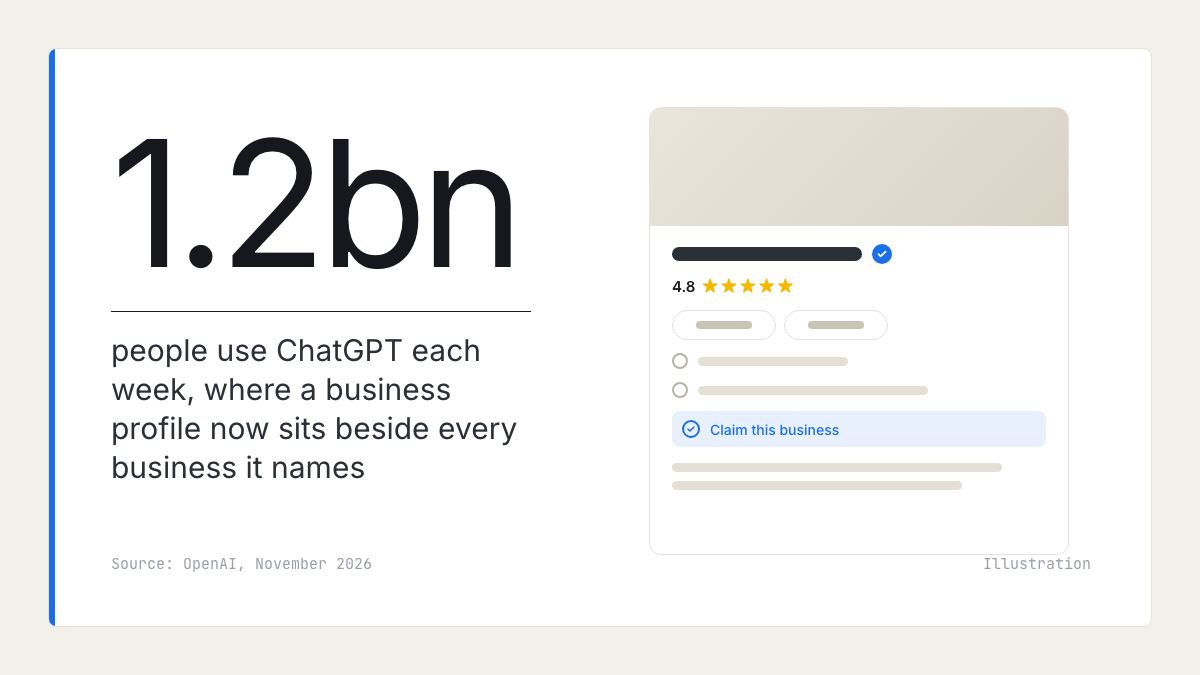
What a ChatGPT business profile shows
When ChatGPT recommends a local business, it shows a card with a photo, usually a star rating and review count, a one-line description and the address. Click the name and the full profile opens beside the answer.
We asked ChatGPT, in a temporary chat on 12 November, for a good independent coffee shop in Richmond, London. It named three, and two of the cards showed a rating and a count, such as 4.8 from 244. The first one's profile held:
- Directions and Website buttons, today's opening hours and the address.
- A Claim this business link, so the owner had not claimed it.
- A description written by ChatGPT, citing the café's own website.
- What people say, What to order and What it's like: short summaries, each citing the café's website or local coverage.
- Good to know, which quoted the café's Food Standards Agency hygiene inspection, with its date.
That was one café's profile. The section names suit a café, and other kinds of business may see different ones, so open your own profile to see what it holds. Nothing on the café's profile said where the star rating came from. OpenAI's policy for business profiles says profiles "may also include information from other sources", and its terms let OpenAI supplement, edit or replace what a business submits. In practice a profile is assembled from your website, other sites that write about you, public records and ratings from sources OpenAI does not name, with or without you.
The Good to know line shows that public records can reach a profile, not only what you and your customers write. For the café, that record was its food hygiene rating. We have not checked which records ChatGPT reads for other kinds of business.
Can UK businesses claim their ChatGPT business profile yet?
It depends on what kind of business you run. OpenAI's guide to setting up your business on ChatGPT says availability "depends on the business's location and type", and it spells out two limits: local stores and restaurants can currently claim only an existing US listing, and Business Agents are for eligible US ecommerce and online service businesses.
| Your business | Claim or add a profile now? | Business Agent? |
|---|---|---|
| Online shop or online service with a website | Yes, where verification is supported | No, US only |
| Shop, café, restaurant or salon with premises | Only an existing US listing, for now | No |
| Trades and other service-area businesses | Not stated by OpenAI; check Business Hub | No |
| Existing OpenAI advertisers and Enterprise customers | Through their OpenAI representative | Depends on type |
We tried the first case on ourselves. Rate My Ratings is a UK online business, and it now has a draft profile in Business Hub. Before any business information can be edited, the Hub asks for identity verification with a government-issued ID, and its insights were empty when we looked.
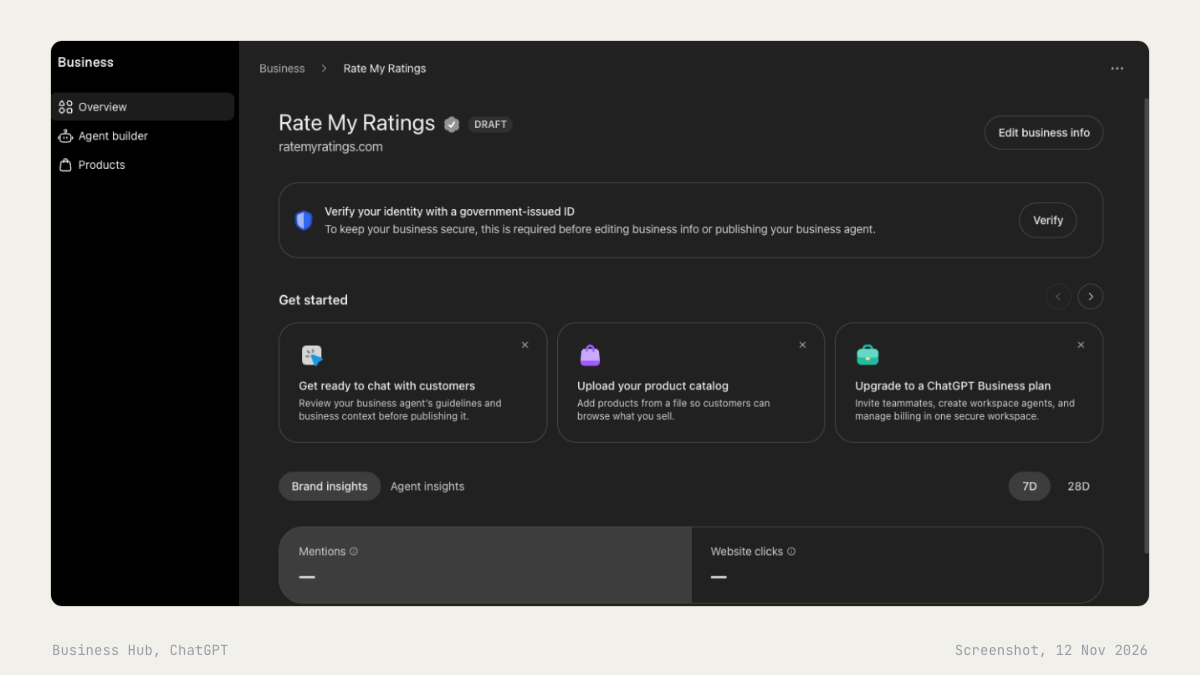
UK premises are already in OpenAI's listings. A search in Business Hub for a well-known London restaurant group returned its branches with full UK addresses, and the Richmond café's profile carried a claim link. We did not test a claim for a business we do not own. Until OpenAI changes its help page, take that page as the rule: a UK café, shop or salon cannot yet take control of its profile, whatever the link says.
How to claim your business in ChatGPT, step by step
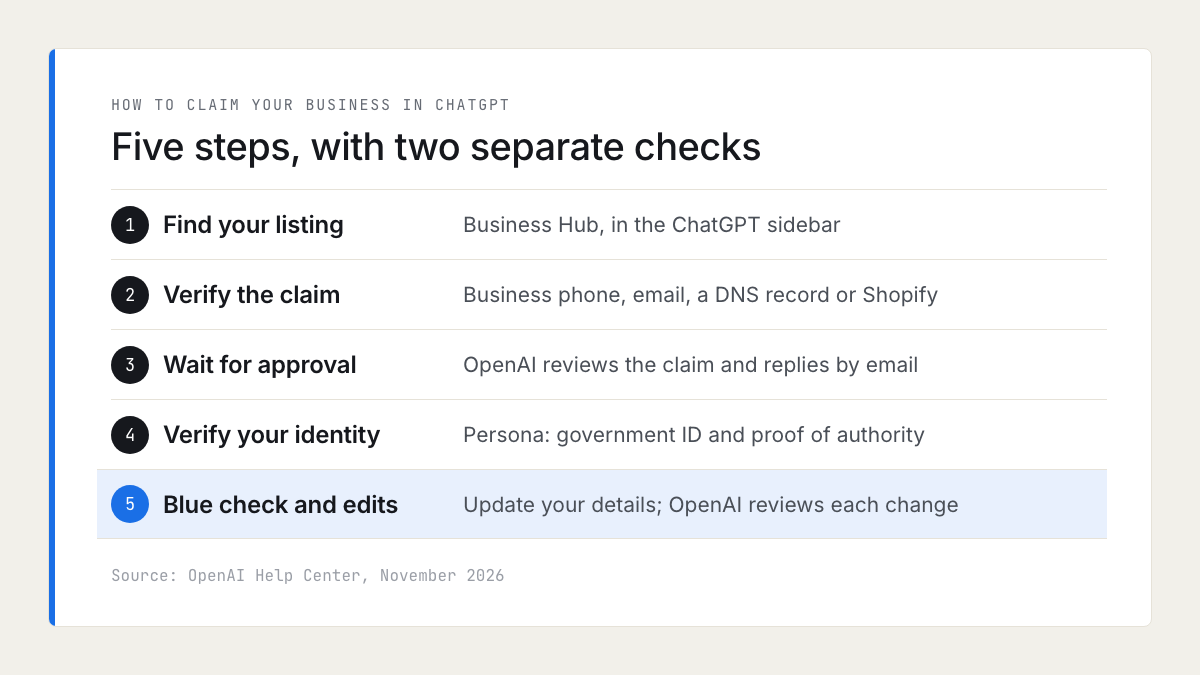
If your business is eligible, the claim has five steps. Do it from a ChatGPT account the business controls rather than a personal one. The person who claims becomes the admin, a published profile cannot be deleted, and a report on OpenAI's developer forum says the Delete draft option disappears once verification has started, and OpenAI documents no way to move a profile to another account.
- Find your listing. Sign in to ChatGPT, open Business Hub from the sidebar and search for your business by name. An eligible online business that is not listed may see an option to add it.
- Verify the claim. Choose your business phone (a text or an automated call), a code sent to your business email, a TXT record added to your domain's DNS, or a Shopify login.
- Wait for approval. OpenAI reviews the claim and emails a decision or a request for more information.
- Verify your identity with Persona. You may be asked for a government-issued ID, business registration details and proof that you can act for the business. The name, address and any registration or VAT number must match your official records, which for a UK company means its entry at Companies House.
- Edit your details. Once OpenAI approves the Persona check, the profile gets its blue check and you can update the website, description, category, logo, delivery and return policies and cover photo. OpenAI reviews each change before it appears.
If you add a new business rather than claim an existing one, the Persona approval publishes the profile straight away, with no separate publishing step. Have your description and category ready before you submit.
Read the terms before you open Business Hub
The screen for adding a business says "By continuing, you accept OpenAI's Businesses in ChatGPT Terms", and the Businesses in ChatGPT Terms apply to anyone who uses Business Hub or provides information through it. Five clauses matter most to a small business:
| Clause | What it says | What it means for you |
|---|---|---|
| 4.1, listings | OpenAI may create and display a listing whether or not you claim it, and may supplement, edit or replace your information | Claiming gives you a say, not control |
| 4.1, phone calls | ChatGPT's assistant may call you on behalf of its users | You can opt out by phone number |
| 4.2, public details | The licence to the name, address, contact details, category, hours and website you submit is perpetual and irrevocable | Those details stay usable after you stop managing the profile |
| 10.1 and 10.2, claims | You agree not to bring, and you release, claims about content on your websites, past or present | The clause to read twice if you object to AI using your content |
| 3, product feeds | Text and data mining opt-outs have no effect against OpenAI | Applies only if you upload a product feed |
On the calls: OpenAI's page for stopping AI phone calls says ChatGPT can ring a business on a user's behalf, for example to ask about opening hours or to make a reservation. A restaurant that takes bookings by phone should decide now whether it wants those calls.
This is a summary, not legal advice. If your website content is part of what you sell, such as recipes, guides or photography, have someone qualified read sections 10 and 11 before you claim.
What Business Hub insights show, and what they do not
After the ID check, Business Hub reports three things over the last 7 or 28 days:
- Mentions. For a local business, a mention counts each time ChatGPT shows a result for that location, even if nobody opens it. For an online business, only a reference to its website counts; the brand name alone does not.
- Website clicks from ChatGPT to your site.
- Discovery topics: the top themes in answers that mentioned or cited you. They are not the questions people typed.
Figures appear only above a privacy threshold, so a blank does not mean zero. You will not see individual prompts, chats with your agent, your competitors, or who was named when you were not. The terms also make these figures OpenAI's confidential information, which you may share only with service providers working for you.
So you still have to ask ChatGPT yourself to see who it names for your customers' questions. Our guide to checking whether ChatGPT recommends your business sets out a monthly method.
What claiming will not change: your rating and your reviews
OpenAI says plainly that claiming "does not guarantee higher placement or sales" and that ChatGPT "continues to make independent recommendations and comparisons". Its help page adds that advertising does not influence ChatGPT's independent answers either.
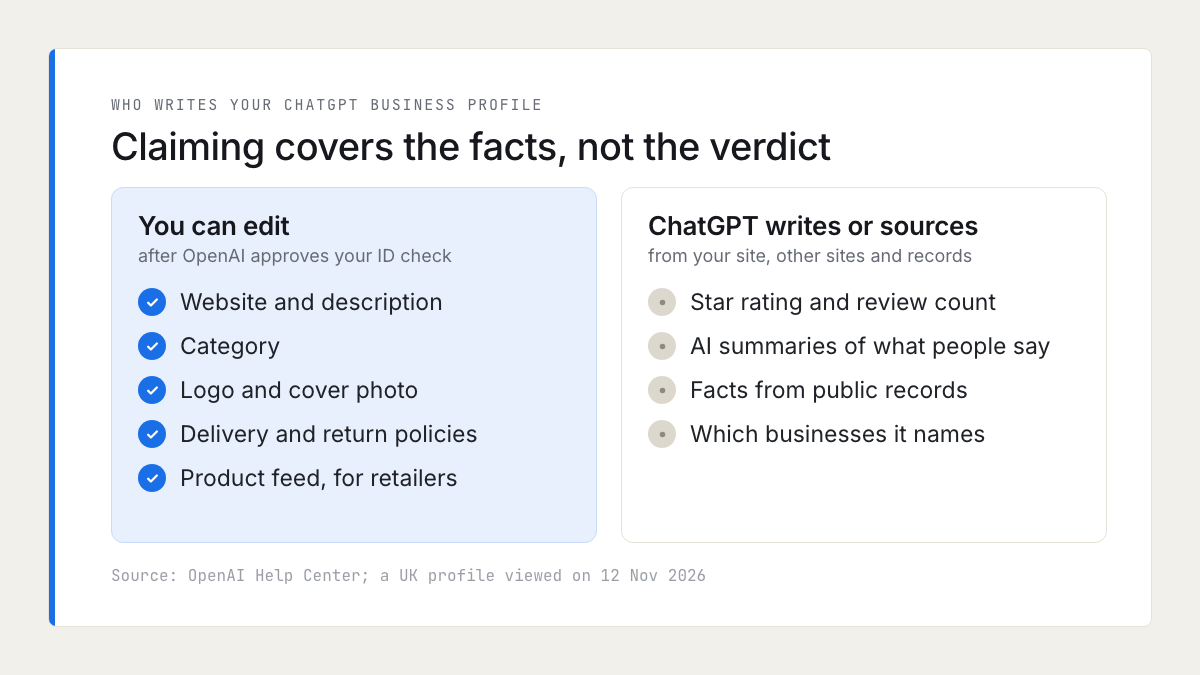
The fields you can edit are facts you already control elsewhere. The parts that persuade a customer, the star rating, the review count and the What people say summary, are not on the list. They come from what customers and other sites say about you, which puts the work where it was before Business Hub existed:
- Reviews. Keep recent, specific reviews coming on Google and on the one review site your sector uses. Which sites ChatGPT reads is covered in does ChatGPT use Google reviews, and how to ask in how to ask for Google reviews.
- Your website. ChatGPT wrote the coffee shop's description from its own site. A page that says what you do, where, when and for how much gives it something correct to quote. The crawler and website steps are in how to get recommended by ChatGPT as a local business.
- Your other listings. Keep your Google Business Profile, Bing Places and Apple Business details identical, since ChatGPT may use other sources when it answers questions about you.
- Public records. Official records about your business can appear on the profile, as the café's hygiene rating did. Treat them with the same care as your reviews.
One rule applies to the profile itself. OpenAI's policy bans fabricated reviews and endorsements on it, and UK consumer law has banned fake reviews since April 2025, as the CMA's fake reviews guidance explains. How to recognise them in your own market is in how to spot fake Google reviews.
What to do this week
- In a temporary chat, ask ChatGPT three questions a customer would ask, with your town in each. If you are named, open your profile and note anything wrong.
- If you run an online business, read the terms, then claim your ChatGPT business profile from an account the business controls. Correct the website, description and category first.
- If you have premises in the UK, you probably cannot claim yet. Fix the facts at their sources: your website, Google Business Profile, Bing Places and Apple Business.
- Decide whether ChatGPT may phone your business, and use the stop-calls page if not.
- Ask this week's customers for a review on Google or your sector's site.
- Look at Business Hub again in a month. OpenAI says it plans to bring Businesses in ChatGPT to more markets and business categories.
How your ratings compare
A ChatGPT answer puts your star rating and review count beside your competitors', a few names at a time, much as a map pack does. Our local market reports show where your rating, review count and share of positive reviews sit against the other businesses in your category and town, and what customers praise and complain about across that market. They contain no ChatGPT or AI visibility data, and they do not explain why an assistant names one business over another.
Frequently asked questions
- Is a ChatGPT business profile free?
OpenAI's pages mention no charge for claiming a business, and its help page says you do not need an ads account or a ChatGPT Enterprise agreement to claim one. Advertising and the ChatGPT Business plan, which Business Hub also suggests, are separate paid products.
- Can a UK business claim its ChatGPT business profile?
Online businesses with a website can claim or add one where OpenAI's verification is supported. OpenAI's help page says local stores and restaurants can currently claim only an existing US listing, so a UK shop, café or salon with premises cannot yet take control of its profile. Business Agents are for eligible US ecommerce and online service businesses only.
- Will claiming my business make ChatGPT recommend it more often?
No. OpenAI says claiming does not guarantee higher placement or sales, and that ChatGPT continues to make independent recommendations and comparisons. Advertising does not change its answers either. Claiming lets you correct your details and see insights on mentions and website clicks.
- Can I change my star rating or remove reviews from my ChatGPT profile?
Not through Business Hub. The fields you can edit are your website, description, category, logo, delivery and return policies and cover photo. The rating, review count and review summaries come from other sources, which OpenAI has not named.
- Can I delete or transfer a ChatGPT business profile?
Only an unpublished draft can be deleted, and OpenAI Support cannot delete, unpublish or hide a published profile. The admin who claimed it can add teammates and give an agency access, but OpenAI documents no way to move ownership to another account, so claim from an account the business controls.
- What does the blue check on a ChatGPT profile mean?
It shows that the profile has been claimed and that the person managing it passed OpenAI's identity verification with Persona. Claiming alone does not add it.
- Can ChatGPT phone my business?
Yes. OpenAI's terms say its assistant may call businesses on behalf of users, for example to ask about opening hours or to make a reservation. You can stop calls to a number on OpenAI's stop AI phone calls page.

Rate My RatingsNewsletter
What reviews say about local markets, in your inbox.
New articles and findings from the blog, as they're published.
Check your inbox.
If this address isn't subscribed yet, we've sent it a link to confirm. Nothing is sent until you click it.
That didn't go through. Check the email address and try again.
Hold on a moment, then subscribe again.
Rate My RatingsNewsletter
What reviews say about local markets, in your inbox.
New articles and findings from the blog, as they're published.
Check your inbox.
If this address isn't subscribed yet, we've sent it a link to confirm. Nothing is sent until you click it.
That didn't go through. Check the email address and try again.
Hold on a moment, then subscribe again.