Best Platforms to Collect Customer Feedback
Most local businesses need three kinds of feedback platform, not one: a public review site where customers already look, a survey tool for the questions reviews do not answer, and a quick way to catch feedback on the spot. How to pick each.
The best customer feedback platforms for a small business are usually three different kinds of tool used together: a public review platform where your customers already look (for most local businesses, Google Business Profile first), a survey tool for private questions that reviews never answer, and a simple way to catch feedback in the moment, such as a QR code or a message after the visit. No single platform does all three well, and buying an expensive all-in-one before you have the basics in place is the most common mistake we see.
This guide explains what each type of customer feedback platform is good for, the main options in each, and how to choose. We have not included prices, which change often; most of the tools below have a free tier or are free outright.
The three kinds of customer feedback platforms
| Type | What it captures | Public or private | Examples |
|---|---|---|---|
| Public review platforms | Ratings and written reviews that other customers read | Public | Google Business Profile, Trustpilot, Facebook, Tripadvisor, sector directories |
| Survey and form tools | Answers to the questions you choose to ask | Private | Google Forms, Microsoft Forms, Typeform, SurveyMonkey, Jotform, Tally |
| In-the-moment feedback | Quick reactions at or just after the visit | Usually private | QR codes, follow-up texts and emails, tablets or comment cards, your booking system's feedback request |
Public reviews bring in new customers and show you how you compare with competitors. Private feedback lets you ask specific questions and hear criticism before it becomes a public one-star review. You need both.
Public review platforms
Google Business Profile
For almost every local business this comes first, because it is where people searching on Google and Google Maps see your rating. It is free. Google's help page on getting more reviews explains how to share a review link or QR code with customers, and notes that customers need a Google Account to leave a review. You must verify your business before you can reply to reviews.
Google's rules matter here: offering an incentive such as a discount in exchange for a review is prohibited. Our guide to getting more Google reviews covers how to ask without breaking them.
Trustpilot
An open review platform: Trustpilot describes itself as one where any consumer can review any business they have had a genuine experience with, and businesses can also invite customers. It matters more for online and national businesses than for a local practice, but some local service firms use it alongside Google.
Feefo
A review platform built around invitations: Feefo says all of its reviews come from verified customers, whom the business invites to review. That makes its reviews hard to fake, but it also means you only hear from customers you invited.
Facebook replaced star ratings with yes or no recommendations in 2018, as BrightLocal reported at the time. It is worth keeping your page tidy and replying to recommendations, but for most local services it is a secondary source of feedback.
Sector platforms
Many trades have their own review sites, and customers in those trades often check them before Google. In the UK, trades directories such as Checkatrade and MyBuilder, healthcare review sites such as Doctify and iWantGreatCare, and Tripadvisor for hospitality all play this role. In Australia, hipages for trades and ProductReview.com.au are common. If competitors in your category collect reviews somewhere specific, your customers probably look there too.
Survey and form tools
Reviews answer the questions customers choose to answer. Surveys answer yours. Any of these will do for a small business:
- Google Forms is free with a Google account, simple and good enough for most surveys.
- Microsoft Forms comes with Microsoft 365, so many businesses already have it.
- Typeform shows one question at a time, which feels conversational on a phone.
- SurveyMonkey is the long-established option, with templates and more analysis.
- Jotform and Tally are flexible form builders that also handle bookings, payments and file uploads.
The tool matters far less than the questions. Our guides to customer survey questions and customer satisfaction survey questions cover what to ask.
For websites and apps specifically, tools such as Hotjar add small on-page surveys and feedback buttons, useful if most of your customers book or buy online.
In-the-moment feedback
The best time to ask is straight after the experience. Practical options:
- A QR code at the till, on the receipt or on the table, linking to a two-question form or your review page.
- A text or email sent automatically after the appointment. Many booking, practice management and till systems can do this already, so check what you have before buying another tool.
- A tablet or comment card at reception, for customers who will not do it on their phone.
Keep these short: one rating and one open question. Longer forms belong in a survey sent later.
Why you need private feedback as well as public reviews
Public reviews are lopsided. In the 524,000 recent Google reviews we have collected across local markets in the UK and Australia, 87% are five stars and 5% are one star. Three-star reviews make up just 2%.
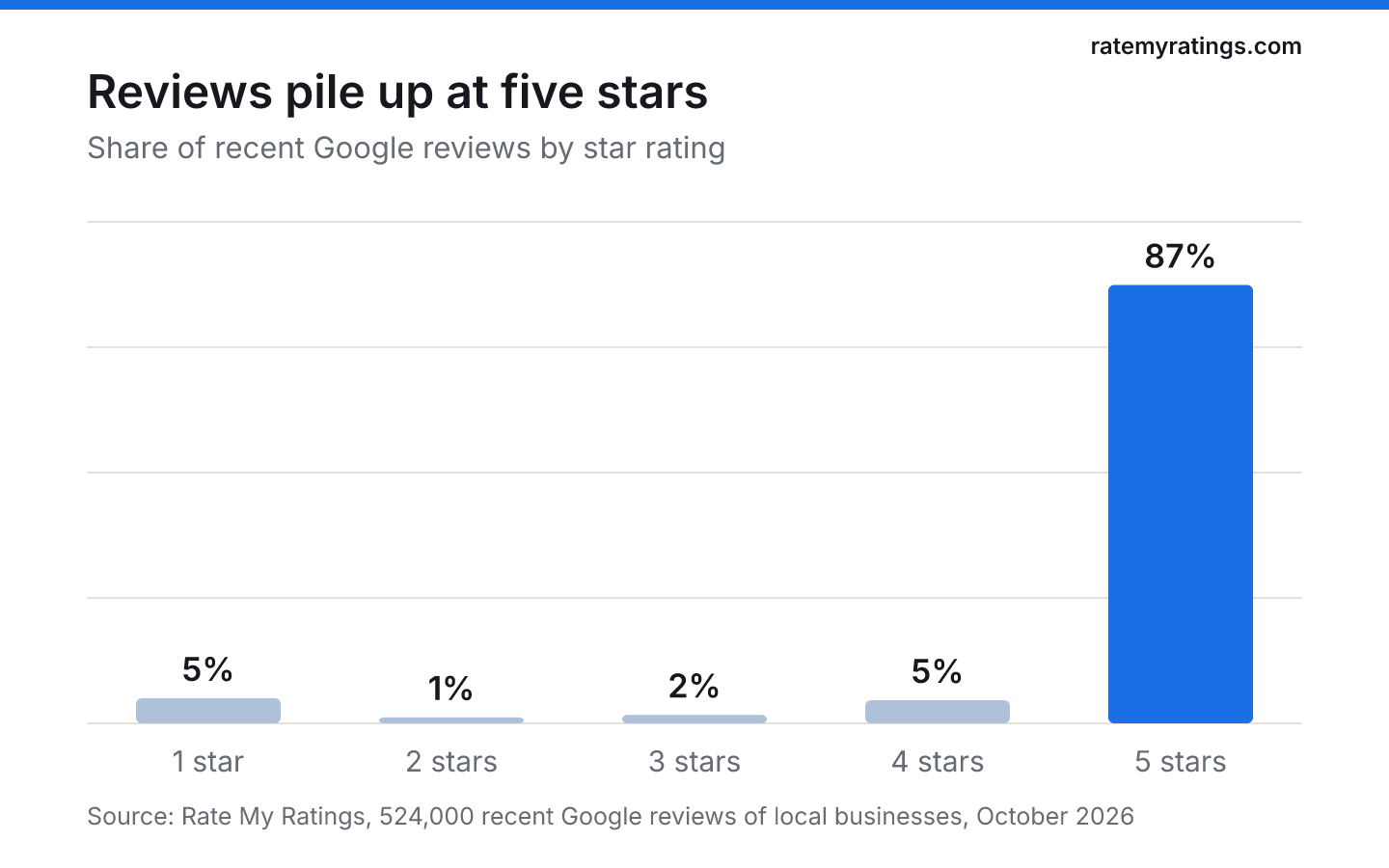
The customers in the middle (satisfied but not impressed, or mildly let down) mostly do not post at all. They are also the customers most likely to drift to a competitor without telling you. A private survey or a quick follow-up message is how you hear from them.
Review management software: do you need it?
Reputation and review management tools pull reviews from several platforms into one inbox, send review requests automatically and help you reply. They save time for multi-site businesses and for anyone collecting reviews in several places. For a single site with one main platform, Google Business Profile's own tools, a booking system that sends a follow-up message and a free form builder usually cover it.
If you are weighing one up, read should small businesses pay for review services? first. It separates legitimate software from services that break the rules.
How to choose your customer feedback platforms
Answer five questions:
- Where do your customers look? Search for your category and town, and see which review sites appear. That is your public platform.
- Where do your competitors collect reviews? The places they are strong are the places customers compare you.
- What do you need to ask that reviews do not tell you? That decides whether you need a survey tool, and which questions to put in it.
- What do your existing systems already do? Booking, till and practice software often include feedback requests. Use them before adding another subscription.
- Who will read and act on it? A platform that nobody checks weekly is worse than none, because customers notice unanswered feedback.
Whatever you choose, treat feedback as personal data: collect only what you need, say how you will use it and keep it secure.
Do not forget the feedback that already exists
Your competitors' customers have already given feedback about your market, in public. Reading it tells you what people in your area value and complain about, without sending a single survey. Our guide to competitor analysis using Google reviews shows how, and a Rate My Ratings market report analyses every review of every business in your category and area. For turning any of this feedback into changes, see how to use customer reviews to improve your business.
The short version
- Most local businesses need three customer feedback platforms: one public review site, one survey tool and one in-the-moment channel.
- Start with Google Business Profile, then add the sector platform your customers and competitors use.
- Use a free form builder (Google Forms or Microsoft Forms) for surveys until you outgrow it.
- Ask for feedback straight after the visit, with one rating and one open question.
- Public reviews skew to five stars and one star; private feedback is how you hear from the quietly disappointed middle.
Frequently asked questions
- What is the best platform to collect customer feedback for a small business?
For most local businesses, Google Business Profile is the most important, because it is where people searching for you see your rating. Add a free survey tool such as Google Forms or Microsoft Forms for private questions, and a quick follow-up message or QR code to catch feedback straight after a visit.
- Is Trustpilot or Google better for reviews?
For a local business, Google usually matters more, because its ratings appear in Google Search and Maps where local customers choose. Trustpilot is more important for online and national businesses. Check which platform appears when you search for your category and town, and where your competitors collect reviews.
- What is the difference between reviews and customer feedback?
Reviews are public and written for other customers, so they influence who chooses you. Customer feedback more broadly includes private surveys, messages and comments written for you. Reviews tell you what customers chose to share; private feedback answers the questions you need to ask and reaches customers who would never post publicly.
- Do I need review management software?
Not always. It helps multi-site businesses and those collecting reviews on several platforms. A single-site business can often manage with Google Business Profile's own tools, a booking system that sends follow-up messages and a free form builder. Avoid any service that offers to write reviews or filter out unhappy customers.

Rate My RatingsNewsletter
What reviews say about local markets, in your inbox.
New articles and findings from the blog, as they're published.
Check your inbox.
If this address isn't subscribed yet, we've sent it a link to confirm. Nothing is sent until you click it.
That didn't go through. Check the email address and try again.
Hold on a moment, then subscribe again.
Rate My RatingsNewsletter
What reviews say about local markets, in your inbox.
New articles and findings from the blog, as they're published.
Check your inbox.
If this address isn't subscribed yet, we've sent it a link to confirm. Nothing is sent until you click it.
That didn't go through. Check the email address and try again.
Hold on a moment, then subscribe again.