Why Are Some Businesses Hiding Their Google Reviews?
A business cannot turn off or delete its Google reviews. When reviews look hidden, the reason is usually Google's filters, a penalty for fake reviews, or a website showing only the good ones. Here is how to tell which.
Most of the time, a business is not hiding its Google reviews at all, because it cannot. There is no setting in a Google Business Profile to switch reviews off, hide them or delete them. When people find Google reviews hidden or missing, the cause is almost always one of four things: Google's own filters holding reviews back, reviews removed for breaking policy, a penalty Google applies to businesses caught with fake reviews, or a business website that shows only the flattering ones.
Knowing which one you are looking at matters, whether you are a customer deciding who to trust or an owner wondering where your reviews went. This guide walks through each, and how to tell them apart.
What a business can and cannot do with its reviews
A business owner with a verified Business Profile can do three things with reviews on Google:
- Reply to any review, publicly, as the business.
- Report a review they believe breaks Google's policies.
- Ask customers to leave reviews.
That is the whole list. An owner cannot delete a review, edit it, choose which reviews appear first, or turn the review section off. Google's policy on prohibited and restricted content decides what stays up, and Google makes the call when a review is reported.
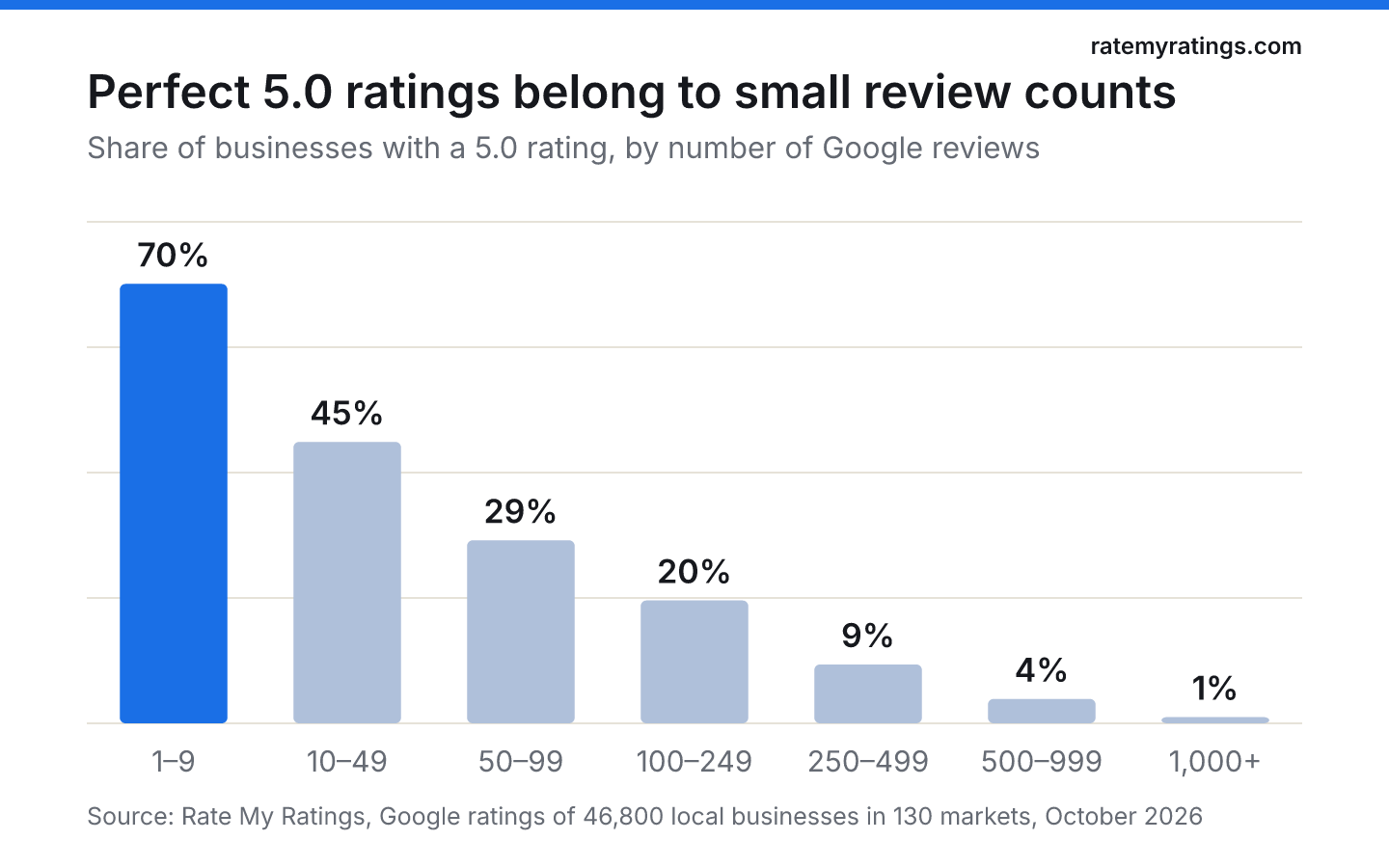
So if a profile has a 4.9 rating with no visible criticism, that is not proof of hiding. In the 46,800 local businesses we track across the UK and Australia, 39% have a perfect 5.0. Most of those are small: 70% of businesses with fewer than ten reviews are rated 5.0, against 1% of businesses with more than a thousand. A spotless record on a small profile is common and usually genuine.
Google reviews hidden by Google's own filters
The most common reason a review "disappears" is Google's moderation. In a 2022 post on how reviews on Google Maps work, Google explained that every review passes through an automated moderation system before it is published, with machine learning as the first line of defence and human operators reviewing flagged content. Systems keep checking after publication too, watching for patterns such as a place receiving an unusually high number of one- or five-star reviews over a short period.
Those filters catch genuine reviews as well as fake ones. Common triggers include:
- links, phone numbers or email addresses in the review text;
- promotional language or mentions of other businesses;
- content that looks off-topic or repetitive;
- many reviews from one location or network in a short time, such as a whole team reviewing from the office wi-fi;
- a brand-new reviewer account posting its first review.
Often the author can still see the review in their own Google Maps contributions while nobody else can, which is why people say a review is "hidden" rather than deleted.
What owners can do
If genuine reviews are not appearing, check whether customers are writing them while on your premises' wi-fi, or from links that encourage them to paste the same wording. Ask them to write in their own words, from their own phones, after they get home. You cannot force a filtered review back up, and Google's help page on reviews is explicit that it does not reinstate reviews removed for policy violations.
Reviews removed or changed by their authors
Reviews also vanish for ordinary reasons. Customers delete reviews, delete their Google accounts, or edit a review after a business has put things right. Google notes that an edited review shows the date of the latest edit as its post date, so an old complaint updated to five stars can appear to have moved.
Our data gives a sense of how many reviews come from occasional reviewers. Of 524,000 recent Google reviews we analysed, 16% came from accounts with only one review. Accounts like these are more likely to be removed or lost over time than the 27% of reviews written by Google Local Guides, who review regularly.
The CMA penalty: warning notices and switched-off reviews
There is one situation where a business genuinely stops receiving reviews, and it is a penalty, not a choice.
In January 2025 the UK's Competition and Markets Authority announced undertakings from Google on fake reviews. Under them, UK businesses found to have boosted their star ratings with fake reviews get a prominent warning alert on their Google profile, and their review function is deactivated so they cannot receive new reviews. Businesses that do it repeatedly can have all their reviews deleted for six months or more. Individuals who repeatedly post fake reviews for UK businesses have their reviews removed and are banned from posting new ones, wherever they are.
So if you see a UK profile with a warning and no recent reviews, the business is not hiding anything by choice. Google has flagged suspicious review activity and frozen the profile. Treat it as a strong signal to look elsewhere, or at least to check the business carefully. Our guide on how to check if a business is legit covers what else to look at.
Websites that only show the good reviews
The other common meaning of "hiding reviews" is about a business's own website. Review widgets and testimonial sliders let a business choose which reviews to display. Showing your best five-star quotes on your homepage is normal marketing. Presenting a hand-picked selection as if it were your whole review record is not.
In the UK, this is now a legal question as well as an ethical one. Schedule 20 of the Digital Markets, Competition and Consumers Act 2024 lists publishing consumer reviews in a misleading way as a banned practice. It explicitly includes leaving out negative reviews while publishing positive ones, and giving positive reviews greater prominence than negative ones. The fake review provisions came into force on 6 April 2025.
For owners, the safe approach is simple: if your website shows a rating or a review feed, show it as it is, or label hand-picked quotes clearly as selected testimonials and link to your full Google profile.
How to check whether reviews are really hidden
If you are a customer and something feels off, a few checks take two minutes:
| What you see | What it usually means |
|---|---|
| Rating and review count shown, few reviews visible | Display or sort order; switch the sort to Newest or Lowest |
| A warning notice on the profile | Google has detected fake review activity (UK) |
| Many recent five-star reviews, all short, all from new accounts | Possible manipulation; read the account histories |
| Website shows only glowing quotes, Google shows a mix | Curated testimonials; trust the Google profile |
| Profile has no reviews despite years of trading | New or merged listing, or reviews removed; check for a second listing |
Sorting by Lowest is the single most useful check. Every business with real customers gets some criticism. In our data, 5% of recent reviews are one-star and about a quarter of the businesses we track sit below 4.5. Reading the worst reviews, and how the business replied, tells you more than any average. Our guide on how Google sorts reviews explains what the default order shows you first, and how to spot fake Google reviews covers the warning signs in detail.
What to do if your own reviews are hidden
If you are an owner and find some of your own Google reviews hidden, work through these steps:
- Check your profile while signed out, or on another device, to see what the public sees.
- Compare your total count with what is visible. A drop in the count means removals; a stable count with fewer visible reviews usually means display or sorting.
- Look for patterns in what disappeared. Reviews posted on the same day, from your premises or containing links are the usual suspects.
- Stop anything that looks like manipulation, including review swaps, incentives and staff reviews. These breach Google's policy and, in the UK, consumer law.
- Keep asking customers properly. The fix for filtered reviews is a steady flow of genuine ones. Our guide to getting more Google reviews covers how.
If you want to see how your review profile compares with every competitor in your area, including their ratings, review counts and what their customers complain about, a Rate My Ratings market report reads all of their public reviews for you.
The short version
Businesses cannot hide Google reviews. Reviews go missing because Google's filters hold them back, because they break policy or are deleted by their authors, or because Google has penalised the business for fake reviews and switched its reviews off, with a warning on the profile. The real "hiding" happens on business websites that show only the good reviews, which in the UK is now a banned practice. To see the truth, sort a profile by lowest and read the replies.
Frequently asked questions
- Can a business turn off Google reviews?
No. A Business Profile has no setting to switch reviews off, hide them or delete them. A business can reply to reviews and report ones that break Google's policies, and Google decides whether to remove them. The only common situation where new reviews stop is when Google itself deactivates reviews, for example as a penalty for fake review activity.
- Why can I see my review but other people cannot?
Usually because Google's automated moderation has held or filtered it. Reviews are checked before and after publishing, and some never appear publicly even though the author can still see them in their own contributions. Reviews containing links, phone numbers, promotional language or off-topic content are more likely to be held.
- What does a warning notice on a Google Business Profile mean?
In the UK, Google agreed with the Competition and Markets Authority in January 2025 to put warning alerts on the profiles of businesses found to have boosted their ratings with fake reviews, and to stop those businesses receiving new reviews. A warning means Google has detected suspicious review activity on that profile.
- Is it legal for a business to show only its good reviews on its website?
In the UK, selectively publishing reviews in a misleading way is a banned practice under the Digital Markets, Competition and Consumers Act 2024. That includes leaving out negative reviews while publishing positive ones, or giving positive reviews more prominence. A curated testimonial section should not be presented as the full record of customer feedback.

Rate My RatingsNewsletter
What reviews say about local markets, in your inbox.
New articles and findings from the blog, as they're published.
Check your inbox.
If this address isn't subscribed yet, we've sent it a link to confirm. Nothing is sent until you click it.
That didn't go through. Check the email address and try again.
Hold on a moment, then subscribe again.
Rate My RatingsNewsletter
What reviews say about local markets, in your inbox.
New articles and findings from the blog, as they're published.
Check your inbox.
If this address isn't subscribed yet, we've sent it a link to confirm. Nothing is sent until you click it.
That didn't go through. Check the email address and try again.
Hold on a moment, then subscribe again.