Do Video Reviews on Google Get More Engagement?
In 524,000 recent Google reviews, photos barely changed how often a review was voted helpful, while long, specific reviews were four times more likely to be. Where visual reviews still matter.
Not by much, on the one engagement measure Google shows publicly. In the 524,000 recent Google reviews we have collected, reviews with photos attached earn a "helpful" vote at almost exactly the same rate as text-only reviews: 2.4% against 2.2%. What does earn engagement is detail. Reviews of more than 200 words are more than four times as likely to get a helpful vote as reviews under 20 words. Google video reviews and photo reviews have their uses, especially for visual businesses, but a long, specific written review does more work for a business than a short clip.
That runs against a lot of marketing advice, so it is worth looking at what video and photo reviews actually are on Google, what our data shows, and where visual reviews genuinely help.
What counts as a video review on Google
On Google, a "video review" is usually one of two things. A customer can attach photos to a review when they write it, and they can contribute photos and videos to a place's listing through Google Maps, which then appear in its media gallery. Google's help page on using the Contribute tab explains how customers add photos or videos to places. Video contributions first arrived for Google's Local Guides programme in 2017; adding photos or videos is now a standard option in the Maps Contribute tab.
Businesses can add their own videos too. Google's guide to managing Business Profile photos and videos sets the limits for owner uploads: up to 30 seconds long, up to 75 MB, at 720p or higher. Those are not reviews, but they sit beside them and shape the same first impression.
Visual reviews are still uncommon. Only 8.5% of the recent reviews in our data include photos, and that share barely changes with the rating: between 8% and 10% at every star level. Unhappy customers are no more likely to attach evidence than happy ones.
What our data says about engagement
The public engagement signal on a Google review is the helpful vote, the thumbs-up other readers can give. It is rare. Only about 2% of reviews receive even one. But the pattern in who receives them is striking.
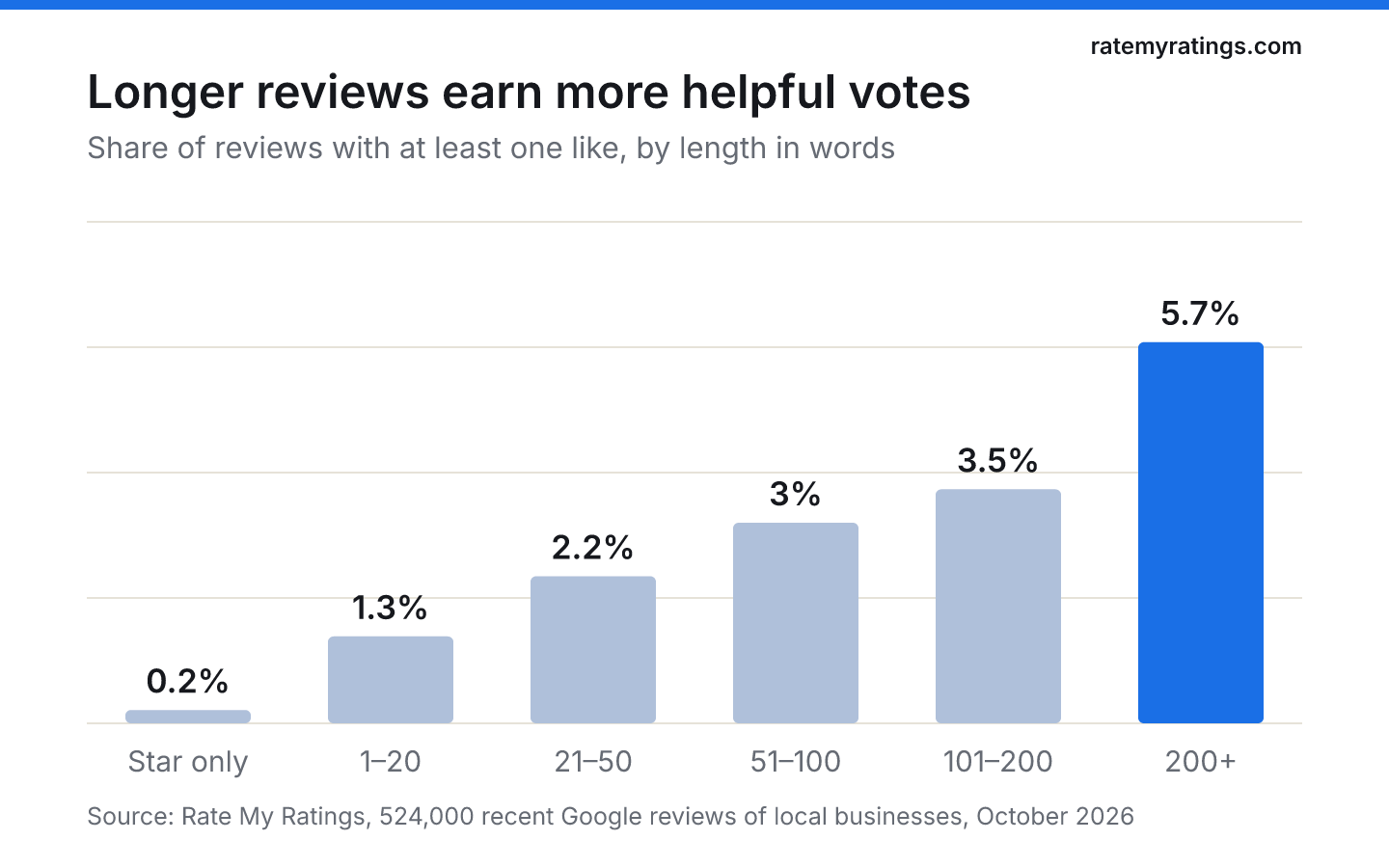
Star-only ratings almost never get a vote (0.2%). Reviews of under 20 words get one 1.3% of the time, and reviews of more than 200 words 5.7% of the time. Readers reward reviews that help them decide, and length is a rough proxy for usefulness: what happened, who helped, what it cost, how it turned out.
Photos, on their own, do not move that number much. A review with a photo is helpful-voted 2.4% of the time; a text review without one, 2.2%. A photo of a plate of food or a shop front adds less than a paragraph that explains why the food was good.
Two caveats. Helpful votes are only one kind of engagement; people may linger on media without voting. And our data covers photos attached to reviews; Google does not publish view counts for review media, so we cannot measure attention directly. But on the signal readers do leave publicly, detail beats decoration.
Where Google video reviews do help
That does not make visual reviews useless. They matter most where the product is something you look at.
- Venues and hospitality. Wedding venues, hotels, restaurants and pubs are chosen partly on how a place looks and feels. A guest's short clip of a room or a garden in use shows what polished marketing photos cannot.
- Visible results. Hairdressers, barbers, tattoo studios, aesthetics clinics, car detailers and builders produce results that a photo proves better than words.
- Spaces customers worry about. A clean, calm vet's waiting room or a modern dental surgery can reassure an anxious first-timer.
- Trust in new businesses. Customer photos show that real people have been there, which helps when a business has only a handful of reviews.
For a plumber, an accountant or an estate agent, visual reviews add much less. Their customers want to read about reliability, communication and price, which is where most complaints in our data concentrate.
How to encourage photo and video reviews, fairly
You can make visual reviews more likely without breaking Google's rules.
- Give people something worth filming. A beautifully presented dish, a finished room, a transformation reveal. Customers capture what impresses them.
- Mention that photos are welcome, once, in your normal request. "If you have a photo, feel free to add it" is fine. Do not tell customers what to write or show, and never ask only the customers you expect to be positive: Google's content policy prohibits requesting specific review content and selectively soliciting positive reviews.
- Never pay or reward for them. Incentives for reviews, including visual ones, are strictly prohibited by Google and, in the UK, reviews that hide an incentive are banned under the Digital Markets, Competition and Consumers Act 2024.
- Keep your own media fresh. Add short videos of your premises, team and work to your Business Profile within Google's limits. It sets the tone for the customer media that follows.
- Reply to every review, with or without media. Thank people for their photos by mentioning what they show.
Our guide to the best ways to encourage customers to leave reviews covers the wider habits that bring reviews in.
Video testimonials on your own website
There is one place where customer video earns its keep reliably: your own website and social channels. A 30-second clip of a happy client explaining what changed for them, recorded with their permission, does a job that a Google review cannot. It sits on the page where a prospective customer is already deciding, and you choose which story to tell.
Two rules keep it honest. Get clear consent for how the clip will be used, and never present a testimonial you paid for, scripted or edited to change its meaning as a spontaneous review. The UK's Digital Markets, Competition and Consumers Act 2024 bans publishing consumer reviews in a misleading way, and the US FTC's rule on fake reviews and testimonials covers testimonials as well as reviews. A genuine customer speaking in their own words is both the most persuasive and the safest kind.
What actually makes a review engaging
If photos and video are not the main driver, what is? The same things that make any review useful to a stranger:
- Specifics: the service, the person who helped, the problem solved.
- Outcome: how things turned out, ideally some time later.
- Balance: a small criticism alongside the praise often makes a review more believable.
- Recency: BrightLocal's 2026 Local Consumer Review Survey found that 74% of US consumers only care about reviews from the last three months. The same survey notes video platforms gaining ground for local recommendations, which is a reason to keep an eye on short-form video outside Google too.
Detailed reviews also matter to how reviews are ordered. Our article on how Google sorts reviews explains why long, specific reviews tend to surface, and our piece on what customers look for in reviews shows which details readers search for. For the difference between a bare star rating and a written review, see Google reviews vs ratings.
If you want to know how visual and written reviews compare across your competitors, and what their customers praise, a Rate My Ratings market report reads every review in your local market.
The short version
- Google video reviews and photo reviews are uncommon: only 8.5% of recent reviews include photos.
- On helpful votes, photos make little difference (2.4% vs 2.2%); length makes a big one (5.7% for 200+ words vs 1.3% under 20).
- Visual reviews help most for venues, hospitality and businesses with visible results.
- Welcome photos in your normal request, but never script content, reward reviews or ask only happy customers.
- Detailed, recent, specific reviews remain the most engaging kind.
Frequently asked questions
- Can you leave a video review on Google?
Customers can add photos to a Google review and contribute photos and videos to a place through Google Maps, which then appear in the business's media gallery. Video contributions started with Google's Local Guides programme in 2017. Businesses can also upload their own videos to their Business Profile, up to 30 seconds long and 75 MB.
- Do reviews with photos get more likes on Google?
Only slightly, in our data. Of 524,000 recent Google reviews, those with photos received at least one helpful vote 2.4% of the time, against 2.2% for text-only reviews. Length mattered far more: reviews over 200 words were voted helpful 5.7% of the time, compared with 1.3% for reviews under 20 words.
- Can a business ask customers to add photos to their review?
You can mention, once and neutrally, that photos are welcome as part of a normal review request sent to every customer. You must not tell customers what to write or show, offer anything in return, or only invite customers you expect to be positive. Google's policies prohibit incentives, selective solicitation and requesting specific review content.
- Which businesses benefit most from video reviews?
Businesses whose product is visual or experiential: wedding venues, hotels, restaurants, pubs, salons, barbers, tattoo studios, aesthetics clinics and builders. Customer photos and short videos show the space or the result in a way words cannot. For trades such as plumbing or accountancy, detailed written reviews about reliability and communication matter more.

Rate My RatingsNewsletter
What reviews say about local markets, in your inbox.
New articles and findings from the blog, as they're published.
Check your inbox.
If this address isn't subscribed yet, we've sent it a link to confirm. Nothing is sent until you click it.
That didn't go through. Check the email address and try again.
Hold on a moment, then subscribe again.
Rate My RatingsNewsletter
What reviews say about local markets, in your inbox.
New articles and findings from the blog, as they're published.
Check your inbox.
If this address isn't subscribed yet, we've sent it a link to confirm. Nothing is sent until you click it.
That didn't go through. Check the email address and try again.
Hold on a moment, then subscribe again.